

PPC
Why Did My Google Ads KPI Change? A Step-by-Step Diagnosis

Reviewed by Abdel Tefridj · Chief Executive Officer

On this page
From a moving number to an actionable diagnosis
Click rate is down 12%. Cost per conversion is up. The dashboard says what moved; it doesn't say why. The usual response is a reflex, not a diagnosis: raise the bid, add a negative, rewrite an ad.
This is the process we run every week on the Google Ads Search accounts we manage. Every move ends in one of two places: a specific change someone can make in under a day, or a clear reason to leave the account alone. Below are the steps and the lessons that shaped them, including our own mistakes.
How to diagnose a Google Ads KPI change in 7 steps
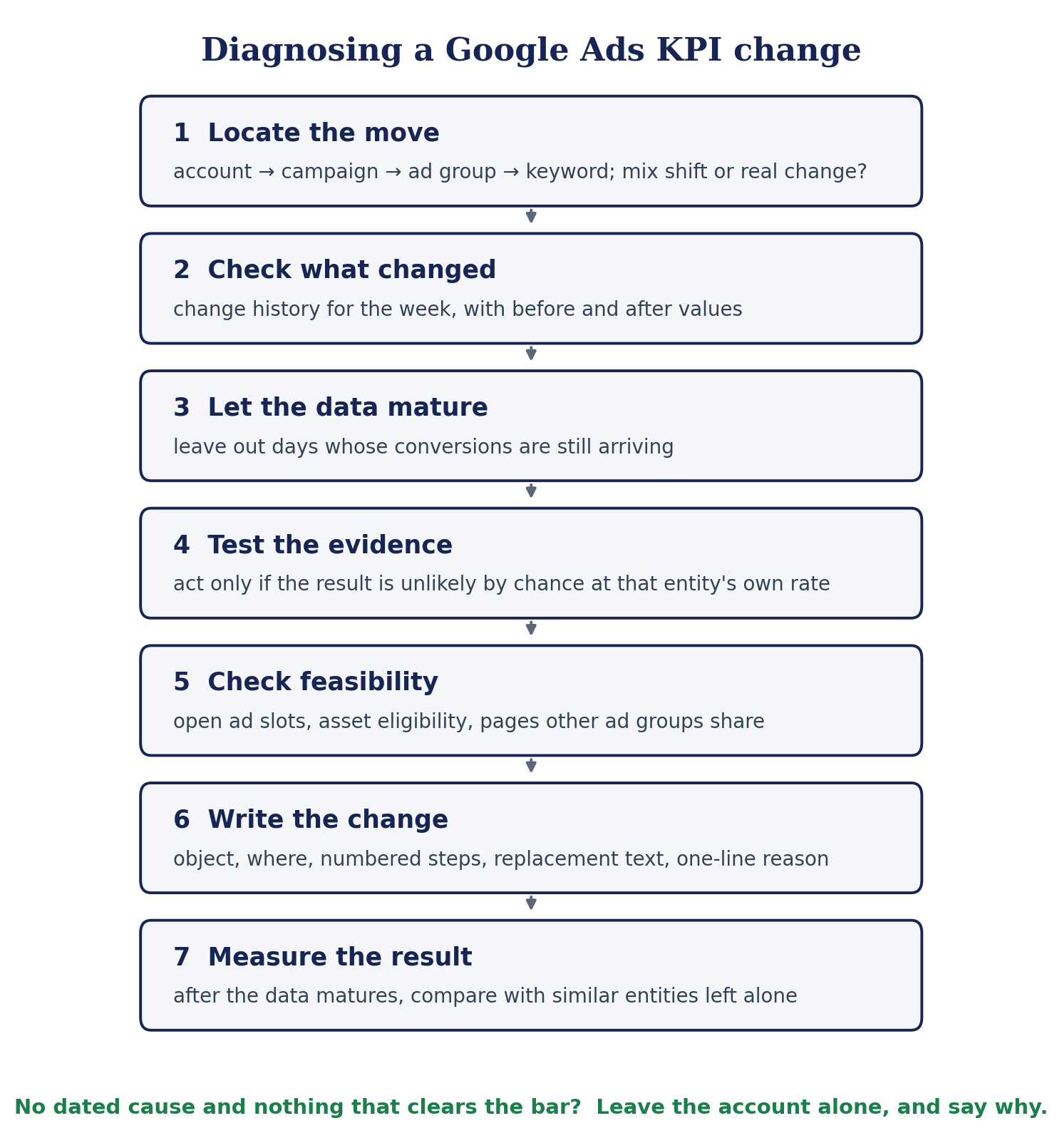
- Locate the move: account, campaign, ad group, keyword. Is it a shift in mix or a real change?
- Check what changed: the change history for the period, with before and after values.
- Let the data mature: leave out days whose conversions are still arriving.
- Test the evidence: act only if the result is unlikely by chance at that entity's own rate.
- Check feasibility: open ad slots, asset eligibility, landing pages other ad groups share.
- Write the change: object, place, steps, replacement text, one-sentence reason.
- Measure the result: once the data matures, against similar entities left alone.
1. Where did the KPI actually move?
Find the level where the change lives before asking why. An account average can move with nothing wrong anywhere: if a high click rate campaign spends less, account click rate falls while every campaign holds steady. That is a mix shift, and it needs no fix.
The reverse is more dangerous. A campaign's cost per conversion can improve while one of its ad groups nearly doubles. Walk down from account to campaign, ad group and keyword, and report the move where it happened: “Ad group Y: cost per conversion from $900 to $1,650”, not “Campaign X improved”.
2. Did something change in the account?
Most weekly swings follow a dated change, so read the change history before blaming long-standing weaknesses. A missing callout or a weak landing page is worth fixing, but it was also true last week. It rarely explains this week.
The before and after values matter more than the fact that something changed. In one account, click rate on a campaign fell by almost half in a week. That week's keyword edits looked guilty, but they were pauses, which cannot widen matching. The cause was an ad group's target cost per conversion, raised by about a quarter. Impressions rose more than tenfold at a third of the click rate: a looser target let bidding into far more, weaker auctions. A higher target can lower your click rate.
Say how a change was made only when Google records it: in the interface, through the API, by a script, an automated rule or an auto-applied recommendation. Never infer it from an email address.
Want to know what actually moved your numbers?
Our KPI Trend Monitor reads every change in the account against the week's movement, so the explanation starts from evidence, not a hunch.
3. Is the conversion data complete yet?
Not for the most recent days. Form fills arrive within days and imported CRM stages within weeks. A “day 7 retention” conversion records a week after the click by definition, so its latest week always looks broken.
Before recommending anything drastic, read through to the latest day. One campaign recorded no conversion for two weeks on more than a thousand clicks, while the same conversion kept recording on every other campaign. Pausing looked obvious. The latest days showed it had already recovered.
After a budget, bid strategy or target change, give bidding a week on one setting. Leaving a campaign alone, with a date and a reason, is a decision, not inaction.
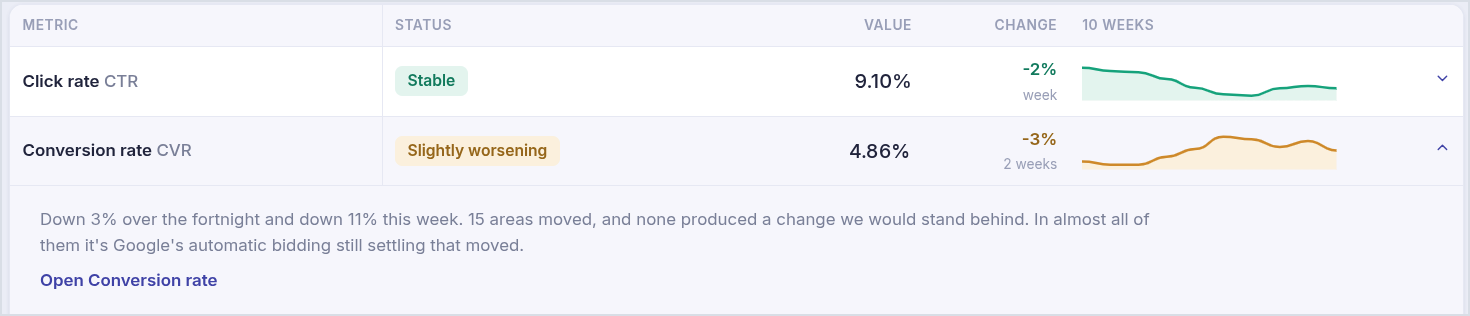
A week where conversion rate moved, but nothing cleared the bar for a change. Account details anonymized.
4. Is the evidence strong enough to act?
Zero conversions means nothing until you know how many you expected. Take an ad group that converts 4% of its clicks. A keyword with 75 clicks there should have brought about 3 conversions; if it brought none, there is roughly a 5% chance that is bad luck. The same 75 clicks at a 1% rate predict less than one conversion, so zero tells you nothing.
- Volume doesn't prove relevance. We once suggested adding search terms as keywords after two conversions, and some had nothing to do with the client's business. A new keyword must also fit what the client sells.
- Weekly checks add up. Test hundreds of keywords every week and a few will look bad by chance. Hold every candidate to the same bar and expect to act on few.
- Ad tests need a real gap. Pause the weaker of two ads only when the difference in click rate holds at 95% confidence.

An ad test that cleared the bar, written as a change anyone can apply. Names and IDs anonymized.
5. Can the change actually be made?
Most bad recommendations fail on feasibility, not logic. We once suggested adding three headlines to an ad that already had all 15. Every change now starts by reading the account as it stands:
- open headline and description slots in that specific ad (15 and 4 at most);
- whether the account already serves an asset type, since some depend on eligibility;
- whether the ad group takes keywords at all (dynamic ad groups don't);
- whether other ad groups share the landing page you want to rewrite.
When a slot is full, replace instead of add. When a page is shared, give the ad group its own page, or reuse one the account already has.
6. How should a change be written?
So that someone who has never seen the account can apply it from the text alone. Each change has five parts:
- A title naming the object: “Replace 3 low click rate headlines in the Inventory ad group's responsive search ad”.
- Where: the campaign and ad group, or the page and its elements (H1, intro, primary button).
- Steps, including what people forget: keep pins, keep the form, copy keywords before removing them.
- The replacement: the current text and its click rate next to the new text.
- One reason built on evidence: “These 3 headlines get 1.4% click rate against 3.6% for the others.”
One change, one place: if it helps two KPIs, it appears once, tagged with both.
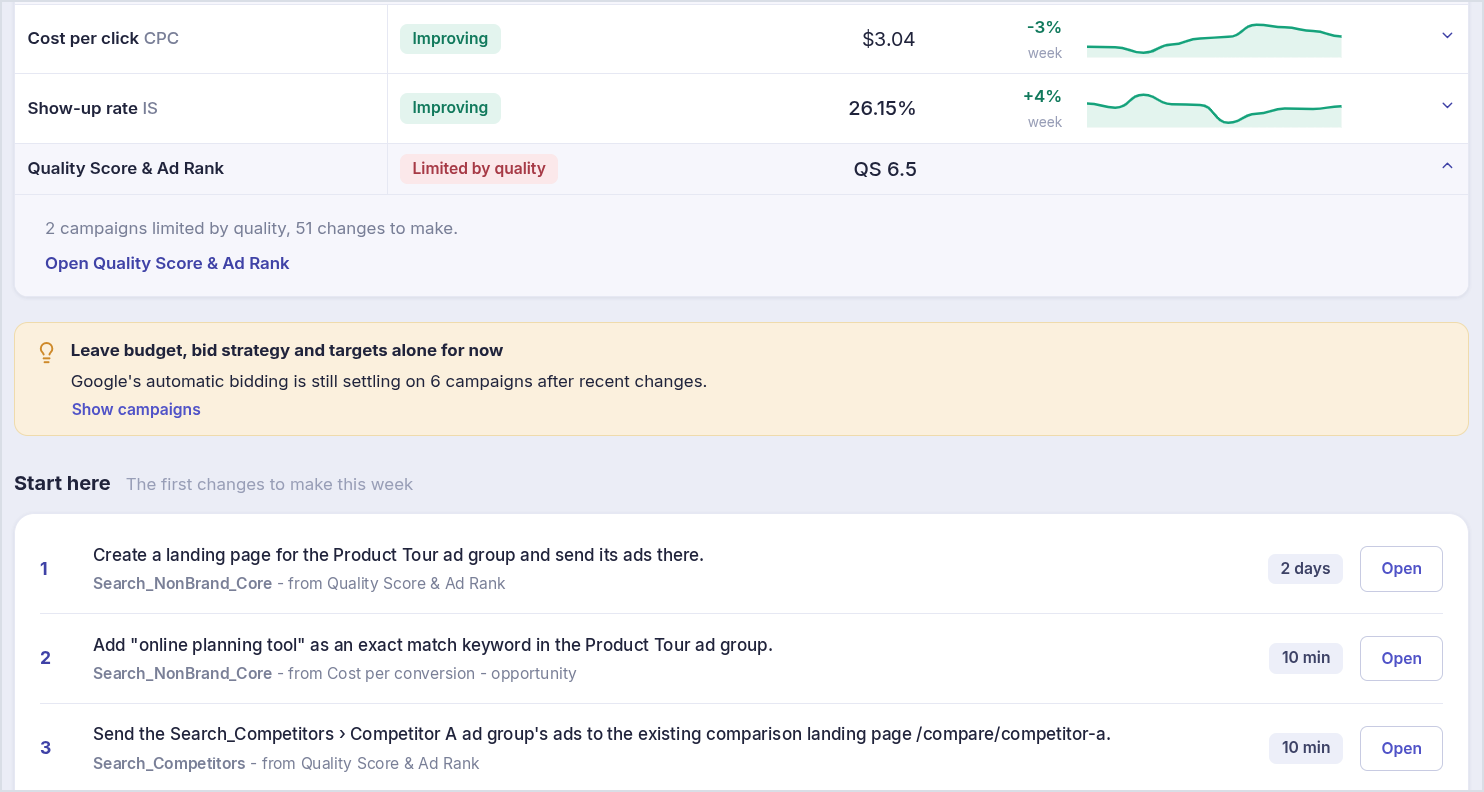
The first changes of a week: each names the object and place, and the time it takes. Names, keywords and figures anonymized.
Get changes your team can make, not charts to interpret
Our Weekly Action Plan turns each week's movement into a short list of specific changes, ranked by what they are worth.
7. Did the change work?
Compare the changed ad group or keyword with similar ones left alone, after the data matures. Seasons and competition move the whole account, so a before-and-after on its own misleads. Make one change per ad group per window, call the result better, worse or too early to tell, and revert what made things worse with the same care it was made with.
Where does Quality Score fit?
It is the cost lever that doesn't require spending more. Better ad quality raises Ad Rank and lowers cost per click.
Quality Score is Google's 1 to 10 diagnostic of expected click rate, ad relevance and landing page experience (About Quality Score). Rank the work by spend at stake, not by score: weight the spend rated below average by component and start at the top, usually competitor and broad non-brand campaigns. Then match the fix to the component: headlines that carry the searched phrase for expected click rate, ad groups split by intent for ad relevance, and a page that answers the search for landing page experience.
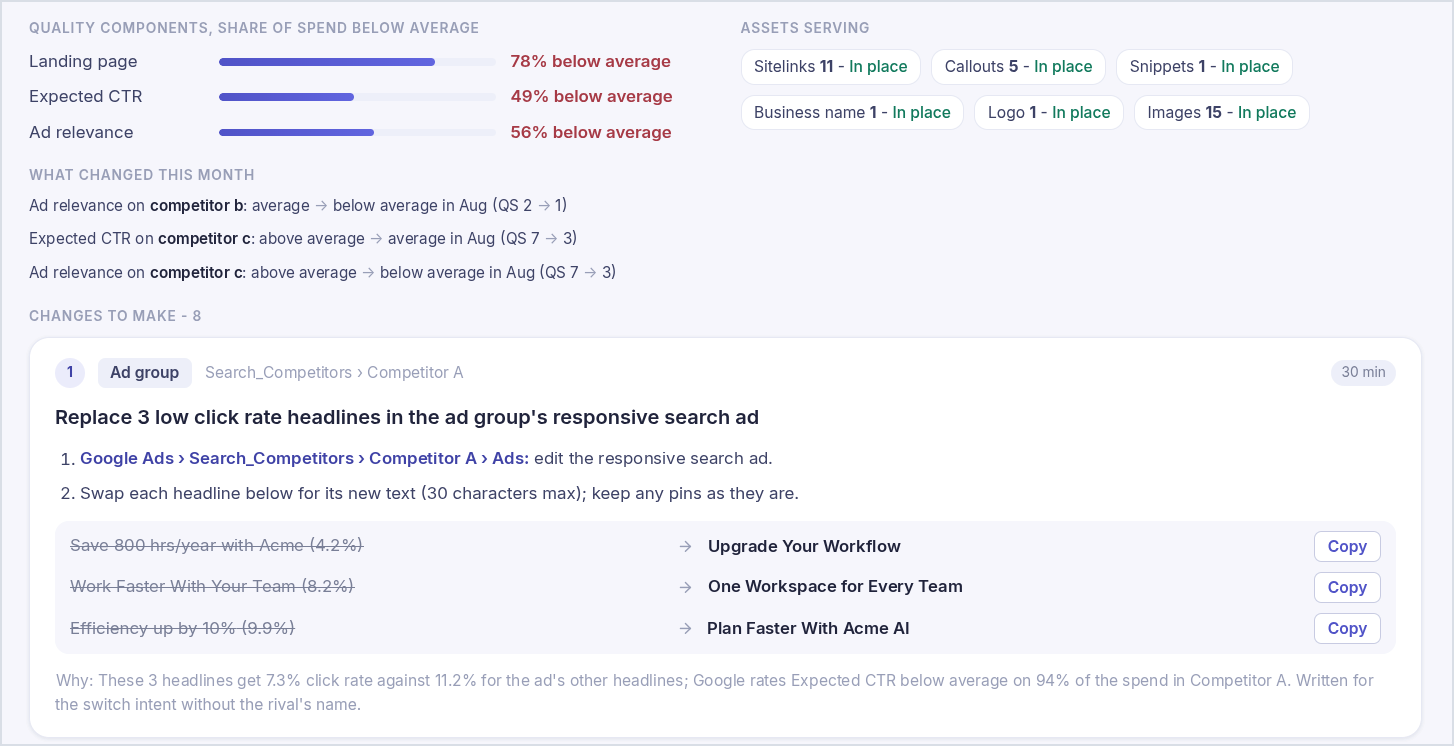
One campaign on our Quality Score page: what is below average, what changed this month, and the first fix with its replacement text. Names, brand and copy anonymized.
What should stay with people?
Decisions that depend on information the account doesn't hold. Budgets and bid targets depend on margins and sales capacity: flag the constraint and let a person decide. A drop in recorded conversions can be a broken tag, lag or real demand: report the observation, not a repair order. And give each job one owner. In our accounts, negative keywords run through their own process, so two systems never edit the same list.
What if nothing moved?
A stable week isn't a clean account. Some fixes depend on how the account stands, not on what changed:
- Keywords that should have converted and didn't: narrow broad match to phrase rather than pausing, and leave keywords that carry a core product alone.
- People only “interested” in your area converting far worse than people in it: set the location option to presence (Google's guidance).
- Search partners converting well below Google Search: turn them off for that campaign.
- Search terms with repeated conversions that fit the business: add them as exact keywords.
Common causes by KPI
Dated causes have a date in the change history; standing causes were already true before the move.
| KPI | Dated causes to check first | Standing causes | First check |
|---|---|---|---|
| Click rate | New or edited ads; keyword or match type changes; a raised bid target | Weak headlines; one ad group serving several intents | Top of page share, then the change history |
| Cost per click | Bid strategy or target changes; stronger competition | Quality Score components below average | Impression share lost to rank |
| Impression share | Budget or target changes; paused keywords or ads; disapprovals | Low Ad Rank; a budget cap | Lost to budget versus lost to rank |
| Conversions | Paused campaigns or keywords; page or form changes | Volume capped by budget or rank | Did clicks fall, or the conversion rate? |
| Conversion rate | Page or form changes; broader matching; location or network settings | A page that doesn't answer the search | Search term and page mix; is the window mature? |
| Cost per conversion | Any of the above | Any of the above | Split into cost per click and conversion rate |
Key terms
Click rate (CTR): clicks divided by impressions.
Cost per click (CPC): spend divided by clicks.
Impression share: the share of eligible auctions where your ad showed; the rest is lost to budget or to rank.
Conversion rate: conversions divided by clicks.
Cost per conversion: spend divided by conversions; it moves when cost per click or conversion rate moves.
Mix shift: an average that moves because spend moved between segments that each performed the same.
Conversion lag: the time between a click and its conversion; the most recent days are always incomplete.
Frequently asked questions
How long should I wait before judging a drop in conversions?
Until the window has matured: leave out the most recent days that conversions usually take to arrive in your account. That is a few days for form fills and can be several weeks for CRM stages imported later.
Do bid adjustments still matter with Smart Bidding?
Mostly not. Smart Bidding ignores most bid adjustments; a device adjustment of −100% is the exception, and exclusions such as locations, schedules and audiences are still respected (Google's bidding FAQ).
Can Performance Max take traffic from my Search campaigns?
Yes, but a Search keyword identical to the search term takes priority over Performance Max, unless the Search campaign is limited by budget (Google's prioritization rules).
Is Ad Strength a measure of performance?
No. It rates how complete and varied an ad is, and independent studies found it doesn't predict results (Optmyzr). Judge each headline and description by its own clicks and conversions.
How many changes should I make at once?
One per ad group per measurement window. A new headline, a new page and a new keyword in the same week make the result impossible to read.
Google Ads specifics, as of October 2026
These details change faster than the method above; this box is reviewed every quarter.
• Responsive search ads take up to 15 headlines and 4 descriptions.
• Each headline and description reports its own clicks and conversions, which replaced the old performance label.
• In AI Max for Search campaigns, keywords match like broad match unless search term matching is turned off for the ad group.
• A Search keyword identical to the search term takes priority over Performance Max.
• Smart Bidding ignores most bid adjustments; device −100% and exclusions still apply.
Weekly KPI review checklist
☐ Each move is traced to the campaign, ad group or keyword where it happened
☐ Mix shifts are separated from real changes
☐ The change history is read with before and after values
☐ Conversion windows have matured; lagging conversion actions are known
☐ Drastic changes are checked against the latest day of data
☐ Every change clears an evidence bar suited to what it could break
☐ Every change is possible in the account as it stands
☐ Every change names the object, place, steps, replacement and reason
☐ Budgets, bid targets and tracking are flagged for a person
☐ Each change has a date to measure whether it worked
Is your weekly report telling you what to do?
If your team spends the weekly review debating why numbers moved, the problem is usually the process, not the people. At Data Bid Machine (DBM), senior PPC strategists work with our own KPI monitoring, which explains each week's movement from the account's evidence and turns it into a short list of changes worth making. In a free account review, we will trace your biggest KPI moves of the last month to their causes, rank your Quality Score work by spend at stake, and hand you the changes with steps and replacement text.
About the author
Djibrim Atto is an AI Engineer at Data Bid Machine, where he builds the KPI monitoring and automation behind DBM's PPC platform: the system that diagnoses each week's Google Ads movement across client accounts and writes the changes described here.
Sources and further reading
- About Quality Score for Search campaigns — Google Ads Help
- Bidding FAQ: bid adjustments with Smart Bidding — Google Ads Help
- About ad group and asset group prioritization — Google Ads Help
- About campaign level asset reporting for responsive search ads — Google Ads Help
- About reporting in AI Max for Search campaigns — Google Ads Help
- Prevent clicks outside of your geo-targeted locations — Google Ads Help
- Ad Strength & creative study — Optmyzr
- How to Reduce Cost per Conversion in Google Ads (Lead Gen Edition) — Data Bid Machine
Google Ads features and account eligibility change. Check the linked documentation and your account settings before applying changes.