

PPC
Google Ads Wasted Spend: Why Negative Keywords Alone Won't Fix It

Reviewed by Abdel Tefridj · Chief Executive Officer
On this page
The short answer
To reduce wasted spend in Google Ads, measure waste at the deepest funnel stage you trust (qualified pipeline, not clicks or form fills), then route each kind of waste to its own fix: negative keywords for junk you can name, tighter match types for diffuse leakage, and settings changes for traffic that automation bought on your behalf. Negatives are the tool everyone reaches for first, but in the account where we measured it, they covered only about a fifth of the waste we could prove.
We manage and audit Google Ads and Microsoft Ads accounts for B2B software companies, and wasted spend is the problem we have spent the most hours on. This post shares what the data showed across those accounts, with every client anonymised, and the two tools we built because of it. Four findings changed how we work:
- In one account, search terms with no conversions took 37% of the non-brand spend visible in the search terms report over a two-week window.
- Nameable negative-keyword themes covered only 22% of the waste we could evidence in another account. The rest was a long tail no list could catch.
- Broad match looked only 1.4x as expensive as exact per marketing-qualified lead, but 3.5x as expensive per sales-qualified lead.
- An automated matching feature cut cost per click by 40% in one campaign while cost per demo request rose by 42%.
What counts as wasted spend in Google Ads?
Wasted spend is ad spend that cannot reach the outcome your business actually pays for. In B2B lead generation that outcome is a sales-qualified lead or pipeline, not a click and not a form fill. A click that produces a form from a student, a job seeker or an existing customer looking for their login page is waste, even when Google counts it as a conversion.
That definition matters because most waste reports stop at the click or the lead. When we judged the same accounts against sales-qualified leads instead, the waste moved: match types that looked acceptable on leads turned out to be the expensive ones on pipeline.
In practice, waste comes in four forms, and each one needs a different fix:
| Form of waste | What it looks like | The fix that works |
|---|---|---|
| Junk you can name | Queries with a clearly wrong intent: jobs, login, free templates, a different product category, users of a tool you don't replace | Negative keywords |
| Diffuse leakage | A long tail of loosely related queries, each too small to judge alone, that broad and phrase match keep finding | Tighter match types |
| Dead keywords | Keywords that keep spending for months without producing the outcome you pay for | Pause, but only on evidence |
| Automated expansion | Traffic bought by settings the platform switched on: keyword-free matching, final URL expansion, auto-written ads, partner networks | Turn the setting off where the data shows it, and buy the winners directly |
One caution before the evidence. A search term with no conversion is not automatically waste. A term with five clicks in an ad group that converts at 2% would be expected to produce 0.1 conversions, so zero tells you nothing yet. Waste is a verdict you reach with enough data, not a column you sort by.
Where the waste hides: five findings from B2B accounts
The figures below come from four B2B software accounts we manage or audited in 2026, labelled A to D. Every number was pulled from the Google Ads or Microsoft Ads API and, where we judge quality, from the client's CRM stages imported as conversions. Client names, campaign names and absolute budgets are left out on purpose.
1. A third of search-term spend never converts
In Account A, search terms with zero conversions took 37.0% of the cost shown in the search terms report across four US non-brand campaigns over 14 days. That figure is the pool of waste candidates, not the verdict: part of it is low-volume terms that simply haven't had the clicks to convert yet. It is still the number that tells you how much spend deserves a closer look every week.
2. Most spend never shows up in the search terms report
Google withholds low-volume search terms for privacy, a change it announced in 2020, so the search terms report shows only part of what you paid for. In Account D, the terms report covered about 22% of spend, and in one ad group of Account C it showed 109 of 349 clicks. Any waste analysis built only on search terms is working from a minority of the money. We start from keyword-level data, which accounts for all of it, and use search terms to explain what a keyword is matching.
Working that way, 68 of Account D's 220 active keywords (31%) had produced no conversion in 90 days.
3. Negative keywords reached about a fifth of the waste
Negatives only block what you can name. When we ran Funnel Cleanup, our keyword review engine, on Account B (90 days of spend, judged against 12 months of qualified-lead outcomes), the waste themes clear enough to put on a negative list covered 22% of the evidenced waste. The rest was a diffuse long tail of loosely related queries, each too small to name or judge alone. The spend we routed to tightening match types was about seven times the spend we routed to negatives.
This is the core reason negatives alone don't fix waste. A list can't keep up with a long tail that broad matching regenerates every week, and Google's own documentation confirms negatives don't match close variants, so each variation needs its own entry.
4. Broad match looks efficient on leads and expensive on pipeline
In Account B's non-brand search over 90 days, broad match cost 1.4x as much as exact per marketing-qualified lead (MQL). Per sales-qualified lead (SQL), it cost 3.5x as much. The gap is funnel efficiency: 19% of broad-match MQLs became SQLs, against 48% for exact. Over 12 months the split was 18% against 43%, so it is a pattern, not a seasonal dip.
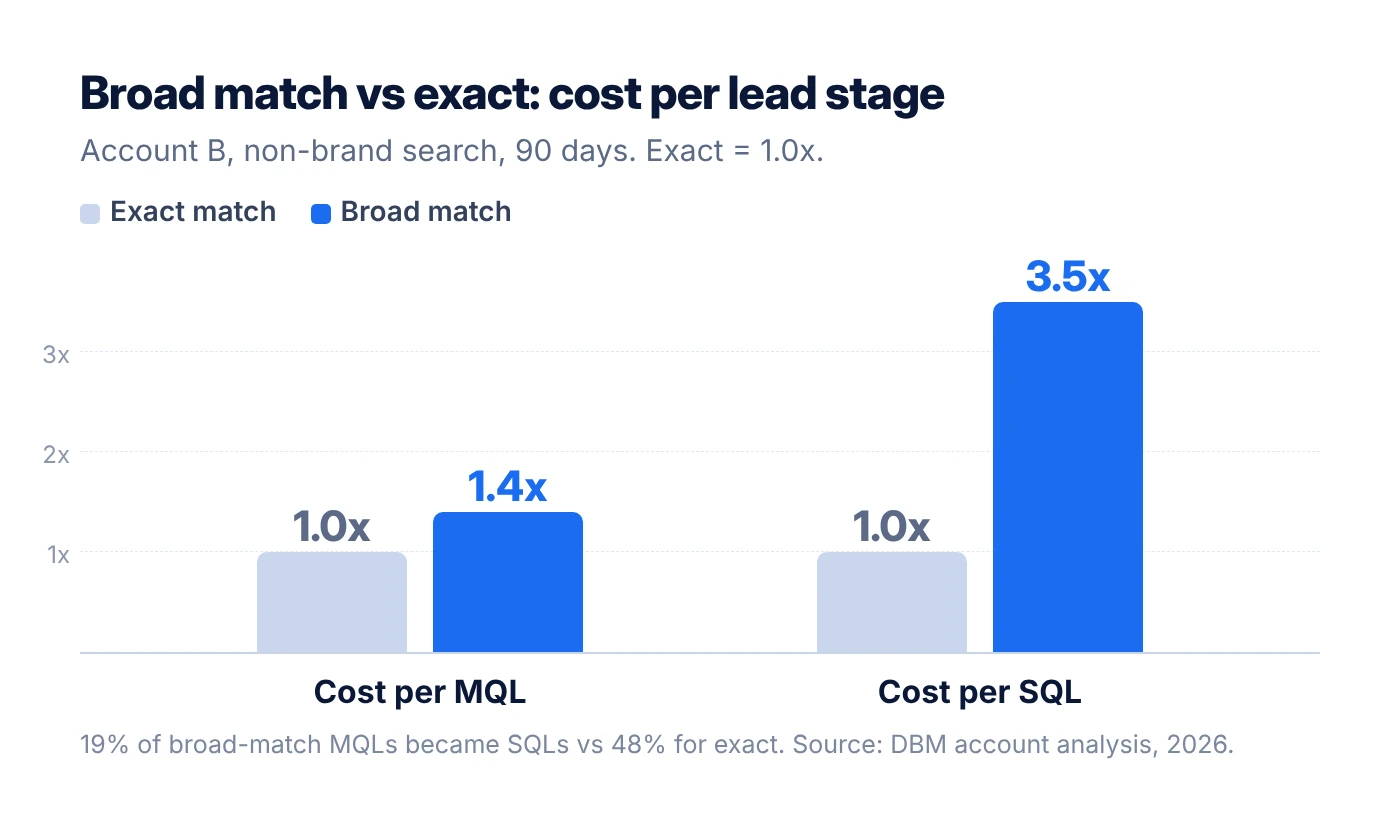
Account C showed the same shape one stage earlier. Broad match cost 3.4x as much as exact per MQL, and phrase match cost more still. On Microsoft Ads, phrase-match close variants held 42.7% of Account C's Microsoft Ads spend at a cost per conversion 3.9x that of true exact matches. Even exact match isn't fully exact: close variants let exact keywords match loosely related queries that spent without converting.
5. Automated matching cut click costs and raised lead costs
Account B tested AI Max in two Search campaigns. Over its first three weeks:
- AI Max-matched queries took at least 33% of the two campaigns' spend.
- In the campaign where AI Max took the larger share, keyword-free matching bought 307 clicks and produced zero leads of any kind.
- 87% of that campaign's AI Max clicks came from people outside the client's market or looking for free templates. Buyer-intent clicks fell from 18% on the campaign's own keywords to 5% on AI Max queries.
- There, AI-written headlines drew on blog content, and 81% of those clicks landed on blog posts, calculators and event pages, with no leads.
- Comparing that campaign before and after AI Max, clicks rose 19% and cost per click fell 40%, but demo requests halved and cost per demo request rose 42%. Real-time website demo forms fell from four to one, so the drop was not a CRM delay.
One AI Max query did progress all the way to a sales opportunity. We added it as a keyword, so switching AI Max off loses nothing that keywords can't recover. Cheaper clicks are the most convincing disguise waste has.
How to reduce wasted spend in Google Ads: our 7-step method
We cut waste by judging every keyword against the deepest outcome we can trust, then matching each kind of waste to the one fix that addresses it. These are the steps we run on every account, in this order.
- Judge waste on the deepest outcome you can trust. Import CRM stages such as MQL, SQL and opportunity as conversions, and judge keywords on them. Judged on MQLs, broad match in Account B cost 1.4x as much as exact; judged on SQLs, it cost 3.5x as much.
- Start from keywords, not search terms. Keyword data accounts for all of your spend, while the search terms report can show a minority of it. Use search terms to explain what a keyword is matching, not to size the problem.
- Separate waste you can name from waste you can't. If the bad queries share a theme you can name (jobs, login, free templates, a product you don't sell), block that theme with negatives. Our AI negatives pipeline, described below, does this classification at scale. Scope each negative as narrowly as the evidence: exact match at ad group level for one bad query, phrase match for a theme that is wrong everywhere. If you can't name the pattern, the keyword's match type is the problem, and a negative list will never catch up with it.
- Tighten match types where waste is diffuse. Compare match types on the deepest stage with enough volume to judge. We treat a looser match type as overpriced when it costs more than 1.2x its tighter sibling per that outcome. Google Ads can't change an existing keyword's match type in place, so a downgrade is always two moves: add the tighter copy, then pause the looser one once the tighter copy is serving.
- Pause only on evidence. A keyword with no conversions has only failed once its spend is large enough that conversions were expected. At three expected conversions, zero has about a 5% chance of being bad luck; at one expected conversion it has a 37% chance. Our pause rule also wants the signals to agree: spend well past the target cost per outcome, conversions that never progressed to the deeper stage, and weak relevance to the ad group. Two guards prevent false pauses. We never pause a keyword whose sibling copy in the same campaign has outcome history, and a brand keyword that leaks money gets negatives for its bad queries, never a pause.
- Switch off settings that buy traffic you didn't choose, and keep checking them. Turning on AI Max turns on search term matching, text customization and final URL expansion together, according to Google's AI Max documentation. Search term matching can be turned off per ad group and the other two per campaign. Platforms also opt accounts into partner networks and automatically created assets. They add new opt-ins over time, and Microsoft Ads can reset settings after its own updates, so this is a check for every new campaign and every platform update, not a one-time cleanup. Turn a feature off where your data shows it underperforms, not by reflex.
- Buy the winners directly, then measure honestly. When an automated feature finds a query that converts, add it as an exact-match keyword so you control its bid, ad and landing page. Then compare equal windows before and after, only once conversions have matured, and leave out campaigns moved by seasonality or competitor pressure. Pausing reallocates budget rather than refunding it, so the saving shows up as a better cost per outcome, not a smaller invoice.
One rule sits above all seven steps: our tools prepare every change and a person applies it. Nothing goes live in an account without a human's last click, because a bulk negative list or an aggressive pause can block good traffic as easily as bad.
The tools behind the method
We built two tools so this method runs the same way on every account, every week: an AI negatives pipeline for the waste you can name, and Funnel Cleanup for everything else. Both prepare changes, and a person approves each one before it reaches the account.
The AI negatives pipeline
Our negatives pipeline turns wasted search terms into a reviewed negative keyword list in five steps:
- Find the waste. It pulls every search term that spent without converting and traces each one to the keyword that triggered it.
- Rank by cost. The terms that cost the most come first, so review time goes where the money is.
- Classify with AI. A language model reads each term with the client's business context and labels it competitor, irrelevant or low intent, or sets it aside.
- Choose the scope. Each negative gets the match type and level that block the waste without touching good traffic, and misspellings get their own entries, since negatives don't match close variants.
- Hand it to a person. The categorised list goes to review before anything is added.
In most of the accounts we run it on, at least 90% of its suggestions are correct. When we checked one batch of 195 suggestions against Account C's live setup, none duplicated any of its 2,803 existing negatives and none blocked an active keyword.
Funnel Cleanup
Funnel Cleanup reviews every enabled keyword in an account on every run and sorts the ones that need action into three buckets: pause, tighten the match type, or add negatives. It judges 90 days of spend against 12 months of outcomes, measured on the client's own funnel stages (lead, MQL, SQL) rather than on Google's conversion count.
One test decides between negatives and tightening. When the waste concentrates in queries you can name, the keyword goes to the negatives pipeline with its offending queries attached. When the waste is spread thin, the match type is tightened. That test produced the 22% finding above.
Its guards include the rules from step 5 of the method. It never pauses a keyword whose other match-type copy in the same campaign has outcome history, it never pauses a brand keyword, and it holds its verdicts when conversion tracking breaks, so a data gap is never mistaken for a failing keyword. A separate fast check flags keywords that are burning money right now, without waiting for the 12-month view.
What happened after the cleanup
In Account A, tightening broad-match keywords and cleaning up negatives lowered cost per conversion by 3% and cut the zero-conversion share of search-term spend from 37.0% to 35.2% in the campaigns we changed. The gain is modest, and we report it that way because of how it was measured.
We compared the 14 days before the changes with the 14 days after, waiting until the later window's conversions had matured. We kept only the US non-brand campaigns where the changes landed, because two other parts of the account were moving for reasons that had nothing to do with us: a seasonal dip in one region, and a competitor bidding harder on the brand.
| Changed campaigns, 14 days | Before | After | Change |
|---|---|---|---|
| Zero-conversion share of search-term spend | 37.0% | 35.2% | −1.8 points |
| Cost per conversion (indexed) | 100 | 97 | −3% |
| Conversion rate (indexed) | 100 | 103 | +3% |
Cost per conversion and conversion rate cover all six US non-brand campaigns we changed. The zero-conversion share covers the four of them with search-term data.
Across the whole account, cost per conversion rose 22% in the same fortnight, driven by the seasonal dip and the brand auction. Read at account level, the cleanup would have looked like a failure. Read where it actually landed, it helped, and the waste share moved in exactly the place the negatives were aimed.
That is the standard we hold ourselves to: a small result that is measured and isolated is worth more than a large one that is assumed. It is also why we never promise a fixed saving before looking at an account.
Frequently asked questions
How much of a Google Ads budget is wasted?
There is no honest universal number, because waste depends on which outcome you judge against. In one of our accounts, search terms with zero conversions took 37% of the spend visible in the search terms report over two weeks. Treat a figure like that as the pool of candidates to investigate, then decide what is truly waste by judging it against qualified leads, not clicks.
Are negative keywords enough to stop wasted spend?
No. Negatives only block queries you can name, and they don't match close variants, so every variation needs its own entry. In one account, nameable themes covered 22% of the waste we could evidence. The rest was a long tail of loosely related queries that only a tighter match type, or a paused keyword, can stop.
Can AI find negative keywords for you?
Yes, if it reads each search term with your business context and a person reviews the result. Our AI negatives pipeline classifies wasted terms as competitor, irrelevant or low intent, and at least 90% of its suggestions are correct in most accounts we run it on. The review step still matters, because one broad negative on a common word can block good traffic across a whole account.
Is broad match bad for B2B lead generation?
Not by default, but judge it at the deepest stage you can measure. In one account, broad match cost 1.4x as much as exact per MQL and 3.5x as much per SQL, because fewer than one in five of its MQLs became SQLs. Keep broad where it stays within about 1.2x of its tighter sibling per qualified outcome, and tighten it where it doesn't.
Should I turn off AI Max?
Test it, then let the data decide. In the test we ran, AI Max cut cost per click by 40% while cost per demo request rose 42%, and keyword-free matching produced no leads. Search term matching can be switched off per ad group, so you can keep it where it earns its place. When it finds a converting query, add that query as an exact-match keyword.
Why doesn't the search terms report show all my spend?
Google withholds search terms that don't meet its privacy thresholds, so low-volume queries never appear. In one account, the report covered about 22% of spend. Size waste from keyword-level data, which accounts for all spend, and use search terms to explain what each keyword is matching.
Does pausing keywords save money?
Usually it moves money rather than saving it. With a fixed budget and automated bidding, spend from a paused keyword flows to the keywords that remain. The benefit shows up as a lower cost per qualified outcome, which is the number that matters for pipeline.
How often should you check for wasted spend?
Check search terms and runaway keywords weekly, because broad matching finds new queries every week. Make pause and downgrade decisions on longer windows, such as 90 days of spend judged against 12 months of qualified outcomes, so a quiet fortnight doesn't trigger a cut. Audit opted-in settings on every new campaign and after every platform update.
Where to start
If you do one thing this week, pull cost per SQL by match type for your non-brand search. If broad match costs more than about 1.2x exact per SQL, you have likely found waste that no negative keyword list will fix.
If you'd rather have it done for you, Data Bid Machine runs Funnel Cleanup and our AI negatives pipeline on your Google Ads account and hands back the exact changes, ready to apply. Request a free account review and we'll show you where your budget leaks.
Sources
- Google Ads Help, About negative keywords, accessed November 2026.
- Google Ads Help, How AI Max for Search campaigns works, accessed November 2026.
- Search Engine Land, Google Ads to limit Search Terms reporting, citing privacy, September 2020.
- Data Bid Machine account analyses, 2026: Google Ads and Microsoft Ads API data with CRM stages imported as conversions. Clients anonymised as Accounts A to D.