

SEO
Website Architecture for SEO: A Practical Guide
Reviewed by Abdel Tefridj · Chief Executive Officer
On this page
The short answer: what is website architecture for SEO?
Website architecture for SEO is how you group, link and name pages so search engines and people can reach every important page. A practical architecture uses a shallow hierarchy of topic hubs, crawlable HTML links with descriptive anchors, and readable hyphenated URLs. It also keeps parameters under control and adds an XML sitemap when the site is large or new.
Website architecture checklist: good practice and red flags
A sound website architecture gets seven elements right, and each has a clear red flag you can spot in a crawl. Use this table as the audit list for your own site.
| Architecture element | Good practice | Red flag | Google guidance |
|---|---|---|---|
| Hierarchy | Home, then topic hubs, then detail pages | Key pages reachable only through site search or deep pagination | Organize pages logically so search engines understand how they relate |
| Internal links | <a href> links in navigation, hubs and body copy | Links built with JavaScript onclick handlers or span tags | Google can generally only crawl <a> elements with href |
| Anchor text | Descriptive, concise words about the target page | "Click here," "read more" or keyword-stuffed anchors | Good anchor text is descriptive, concise and relevant |
| URL structure | /services/seo-management: lowercase, hyphens, readable words | Session IDs, long ID strings, underscores, mixed case | Use readable words and hyphens; URLs are case sensitive |
| Parameters and filters | Only useful filter pages indexable | Infinite calendars and endless filter combinations | Complex parameter URLs cause crawl problems |
| Duplicates | One canonical URL per page | Many duplicates with no user-selected canonical | Goal is the canonical version of every important page indexed |
| Sitemaps | XML sitemap of canonical, indexable URLs | Sitemap full of redirects, 404s or noindex pages | Most useful for large, new or media-heavy sites |
Sources for the guidance column: Google's link best practices, URL structure, sitemaps overview, SEO Starter Guide and the Page indexing report.
How to build an SEO-friendly website architecture: 8 steps
These eight steps work for a new build or a restructure, and they run from inventory to monitoring.
1. Inventory every URL you want indexed
A URL inventory is the list of pages you want in search results, and every later step depends on it. Pull URLs from your CMS, a crawl, Search Console and GA4 landing pages. Mark each one as keep, merge, redirect or remove.
2. Group pages into topic hubs
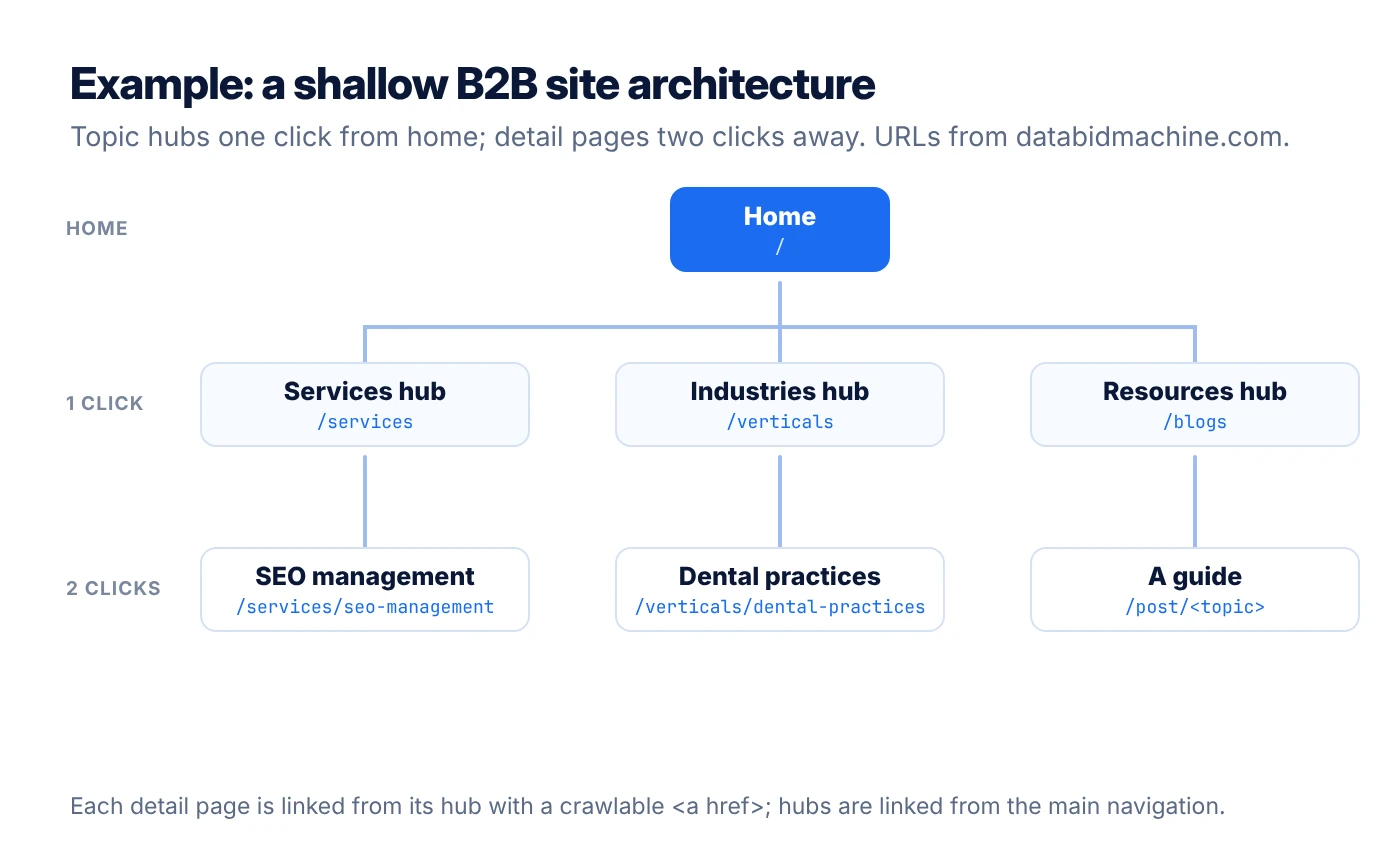
Topic hubs group related pages under one parent page that covers the broad subject. Google's SEO Starter Guide says organizing a site logically helps search engines and users understand how pages relate (Google Search Central). For a B2B site, typical hubs are services, industries, resources and company.
On databidmachine.com, for example, each hub has its own short folder and links to its detail pages:
| Hub | Hub URL | Example detail page |
|---|---|---|
| Services | /services | /services/seo-management |
| Industries | /verticals | /verticals/dental-practices |
| Resources | /blogs | /post/website-architecture-for-seo |
3. Keep important pages close to the homepage
Click depth is the number of clicks from the homepage to a page, and shallow depth helps discovery. Google publishes no fixed depth limit. As a practitioner rule of thumb, keep revenue pages within three clicks and link them from navigation or a hub.
4. Build navigation with crawlable HTML links
Crawlable navigation uses standard <a href> links that Googlebot can follow. Google can generally only crawl <a> HTML elements, so links built with onclick handlers may not be found (Google Search Central). Check menus, tabs and "load more" buttons in a crawler with JavaScript turned off.
5. Write descriptive anchor text
Descriptive anchor text tells people and search engines what the linked page is about. Google says good anchor text is descriptive, reasonably concise and relevant to both pages. Replace "click here" with the topic, such as "SEO audit checklist."
- Navigation links: use the hub name people search for.
- Body links: use a phrase that describes the target page.
- Footer links: keep to key pages, not every URL.
6. Standardize your URL structure
A standard URL structure uses short, readable, lowercase words separated by hyphens. Google recommends readable words over long ID numbers and hyphens over underscores (Google Search Central). Because Google treats URLs as case sensitive, pick one case and redirect the rest.
7. Control parameters and faceted navigation
Parameter control stops filters and tracking codes from creating thousands of duplicate URLs. Google warns that overly complex URLs can make Googlebot use more bandwidth than needed and leave content unindexed. Trim unnecessary parameters, avoid session IDs and use root-relative links.
Google names four common traps in its URL structure guide:
- Additive filtering: filters that stack into endless URL combinations.
- Irrelevant parameters: referral and session IDs that do not change content.
- Infinite calendars: date links that run without end.
- Broken relative links: parent-relative paths that create repeating URL segments.
8. Submit an XML sitemap and monitor indexing
An XML sitemap lists the canonical URLs you want crawled, and Search Console shows whether they are indexed. Google says sitemaps help most on large sites, new sites with few links, and sites with rich media or news (Google Search Central). Submit it in Search Console and review the Page indexing report monthly.
What to measure: the share of sitemap URLs indexed, the number of orphan pages, and average click depth of revenue pages.
Frequently asked questions about website architecture for SEO
What is website architecture in SEO?
Website architecture in SEO is the way pages are grouped, linked and addressed on a site. A good architecture helps search engines discover every important page and understand how topics relate. It covers hierarchy, navigation, internal links, URLs and sitemaps.
How many clicks deep should a page be?
Google publishes no fixed click-depth limit. A common practitioner rule is to keep revenue and priority pages within three clicks of the homepage. What matters most is that every important page has at least one crawlable internal link.
Do I need an XML sitemap?
You may not need an XML sitemap if your site has about 500 pages or fewer and is comprehensively linked, according to Google. Large sites, new sites with few external links, and media-heavy sites benefit most. A sitemap helps discovery but does not guarantee indexing.
Should URLs include folders like /blog/ or /services/?
Folders in URLs are useful when they reflect real sections of your site. Google's SEO Starter Guide notes that grouping topically similar pages in directories can help Google learn how often each section changes. Keep folder names short, readable and stable.
Does Google follow JavaScript links?
Google can generally only crawl links that are <a> HTML elements with an href attribute. Links that rely on onclick handlers or span tags may not be followed. Use standard anchor links for all navigation you want crawled.
How do I find orphan pages?
Orphan pages are pages with no internal links pointing to them. Find them by comparing a site crawl against your sitemap, Search Console and analytics landing pages. Any URL that appears in those lists but not in the crawl is likely orphaned.
Next steps
Website architecture is easiest to fix before you publish more content on top of it. DBM's SEO management team maps your hubs, links and URLs as part of ongoing SEO. A Growth Gap Audit shows where structure is costing you leads.
Sources
Sources accessed October 29, 2026.
About the author: Abdul Hafeez
Contributor, Data Bid Machine
Abdul Hafeez writes about automation, PPC, SEO automation, and practical systems that help marketing teams turn campaign insights into action. His articles explore paid-search strategy, workflow automation, and more efficient ways to manage and improve search marketing.